



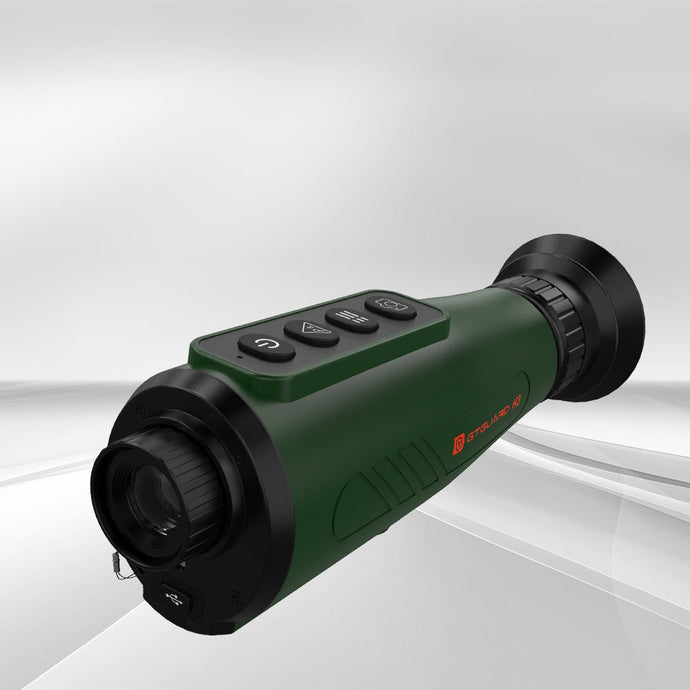
Article Content:
Two years ago, my hunting buddy Mark completely destroyed his $3000 thermal imaging scope through one wrong cleaning procedure. The alcohol completely corroded the lens's special coating, and the manufacturer told him directly: unrepairable. That moment made me realize thermal imaging maintenance is an essential skill every device owner must master.
Why Thermal Imaging Devices Need Special Care
Thermal device care is far more complex than traditional optical equipment. Thermal imaging devices not only contain precision optical components but also integrate sensitive infrared sensors, complex electronic systems, and specialized processing chips. Any component failure could render the entire device unusable.
"Equipment killers" I've witnessed:
- Using ordinary lens paper to wipe lenses (coating scratches)
- Extended use in high-temperature environments (sensor overheating)
- Not addressing moisture promptly (circuit corrosion)
- Direct sunlight on lens (sensor damage)
Thermal Scope Cleaning: My "No-Damage Cleaning Method"
After 6 years of trial and error and multiple painful lessons, I've developed a complete thermal scope cleaning process:
Tool preparation (Importance ★★★★★):
- Specialized microfiber cloths (never use tissues!)
- Anhydrous alcohol (99.9% concentration)
- Specialized cleaning solution (recommend Zeiss or GTGuard original)
- Soft brush (wool or camel hair)
- Compressed air canister
Cleaning steps:
- Power off and cool down (30-minute wait time)
- Compressed air dust removal (center outward)
- Soft brush for stubborn dust (gentle! gentle!)
- Specialized cleaning solution clean (spiral wiping motion)
- Anhydrous alcohol residue removal (quick dry)
Fatal error checklist: ❌ Cleaning while device operating ❌ Using ordinary alcohol or water ❌ Forceful lens wiping ❌ Checking cleaning effect against light
Thermal Sensor Protection: Core of the Core
Thermal imaging sensors are far more fragile than you imagine. I've personally witnessed a $5000 device destroyed by 5 seconds of direct sunlight exposure.
Sensor protection iron rules:
Absolute prohibitions:
- Direct strong light (including lasers, flashes, sunlight)
- High-temperature environments (>60°C)
- Violent vibrations
- Liquid contact
Daily protection measures:
- Avoid strong light sources during use
- Use dedicated lens caps
- Control operating temperature
- Regular thermal imaging calibration
Thermal Equipment Storage: The Art of Long-term Preservation
Improper storage is the second leading cause of device damage. I've seen too many devices suffer from mold, moisture, and battery leakage due to poor storage.
My storage system:
Humidity control:
- Use sealed moisture-proof boxes
- Regular silica gel desiccant replacement
- Humidity meter monitoring (maintain <40%)
Temperature management:
- Avoid extreme temperatures
- Storage temperature: 15-25°C
- Prevent drastic temperature changes
Battery maintenance:
- Remove batteries during long-term storage
- Charge-discharge cycle every 3 months
- Use original batteries
Thermal Device Troubleshooting: Common Problem Solutions
Problem 1: Blurry images or streaking Possible cause: Sensor needs thermal imaging calibration Solution: Use device built-in calibration function or send for service
Problem 2: Rapid battery drain Possible cause: Battery aging or low temperature Solution: Replace battery, monitor operating temperature
Problem 3: Image "dead pixels" Possible cause: Sensor pixel damage Solution: Contact professional thermal service
Thermal Monocular Repair: When to Send for Service
Immediate service situations:
- Image abnormalities (color distortion, large dead pixel areas)
- Mechanical damage (housing cracks, loose lens)
- Electrical faults (won't power on, abnormal heating)
DIY troubleshooting possibilities:
- Image calibration issues
- Settings reset
- Firmware updates
Thermal Imaging Warranty: Warranty Period Considerations
Warranty clause details: Most thermal imaging warranties have strict terms:
- User damage not covered (improper cleaning, drops, etc.)
- Modifications void warranty
- Exceeding operating environment ranges
Warranty period recommendations:
- Retain all packaging and accessories
- Document usage details
- Regular firmware updates
- Avoid self-disassembly
Professional Thermal Service: Repair Service Selection Standards
Official authorized service centers: Pros: Original parts, professional expertise Cons: Higher cost, longer timeline
Third-party repair: Pros: Lower cost, faster service Cons: May affect warranty, variable quality
My recommendations:
- Within warranty: Official service
- Out of warranty: Consider third-party
- High-value equipment: Stick with original manufacturer
Thermal Imaging Calibration: The Art of Calibration
Why regular calibration needed?
- Sensor drift
- Environmental temperature changes
- Usage wear
Calibration frequency recommendations:
- Daily use: Auto-calibration each startup
- Deep calibration: Monthly
- Professional calibration: Annually
GTGuard device calibration method:
- Power on, warm up 5 minutes
- Cover lens cap
- Press and hold calibration button 3 seconds
- Wait for completion prompt
Preventive Maintenance Schedule
After each use:
- Clean lens and housing
- Check battery level
- Confirm storage environment
Weekly:
- Deep cleaning
- Check firmware updates
- Test all functions
Monthly:
- Deep calibration
- Battery maintenance
- Storage environment check
Annually:
- Professional inspection
- Deep maintenance
- Backup settings
Equipment Lifespan Extension Secrets
Gentle use: Thermal imaging devices aren't rugged tools—gentle treatment significantly extends lifespan.
Environmental adaptation: Let device adapt to environmental temperature before use, avoiding drastic temperature differences.
Regular use: Long-term storage actually causes more problems—periodic operation helps maintain condition.
Final Thoughts
Thermal imaging maintenance appears complex but becomes simple once you master correct methods. The key is being careful, patient, and treating equipment as precision instruments.
Remember these key points:
- Never compromise on cleaning procedures
- Control storage environment humidity and temperature
- Regular calibration maintains accuracy
- Seek professional thermal service promptly when problems arise
A $1000 thermal imaging device, through proper thermal device care, can easily last 10+ years. Conversely, a $5000 high-end device might fail within a year without proper maintenance.
Investing in thermal imaging equipment means also investing in thermal scope cleaning knowledge and tools. This is a basic skill every responsible equipment owner should master.


